


Adaptive Cards
This is our comprehensive resource on Adaptive Cards, a cutting-edge technology reshaping the way we interact with digital content. Developed by Microsoft in 2017, Adaptive Cards are a universal Card UI framework designed to standardize the layout of cards across various platforms. This innovative approach allows you to create a card once and deploy it across different environments, with each platform adapting its appearance accordingly.
Beginner’s level
Things you need to know about Adaptive Cards →
We cover everything from Adaptive Card’s origin, to what they can and cannot do for your organization.

Expert level
Tips and tricks to create stunning Adaptive Cards →
Let’s dive into the nitty gritty of what JSON and Adaptive Expressions you can use to create interactive designs

Must read articles about Adaptive Cards

Adaptive Cards roadmap and currently supported versions (Updated Oct ’22)
We’re working a lot with Adaptive Cards at Digital Assistant, and we’re frequently find new features that even Microsoft isn’t reporting about in their blog. So we’ve had an internal wiki page that lists all the different versions, and possibly upcoming features, that we shared in the team. Now we thought, why not share it…

How to make an Adaptive Card with data in MS Teams
Adaptive Cards have become the pre-eminent way to make Cards. They’re simple enough to build, yet interactive enough to be useful for almost any use case. You can read a full insider’s guide about what unexpected pitfalls you should consider. First-time Adaptive Card developers frequently want to make a Card so that it can be…

23 free Adaptive Card templates for businesses (Updated Apr ’23)
Adaptive Cards are a standardized UX for business use cases, such as displaying Adaptive Cards in SharePoint, or to build Adaptive Cards . With the wide range of input types and the flexible layout they are a great way to make portable snippets of information. Related: Building with Adaptive Cards? Here’s what you should consider…
Recent Adaptive Cards articles

Stay organized at work: Todoist is now available as a SharePoint web part

Say goodbye to scheduling chaos: shift planning dashboard in SharePoint

Elevate Engagement: 10 departmental dashboard ideas for SharePoint’s Dashboard web part

Introducing the Copilot in M365 CoE Dashboard: A hub for driving Copilot adoption

The best replacement for Office 365 connectors within Teams

Introducing the Workday Integration for SharePoint and Viva Connections

Calling Teams lovers: See Teams you joined in Teams

New options for notifications and easier empty states
Make an Adaptive Card for your organization
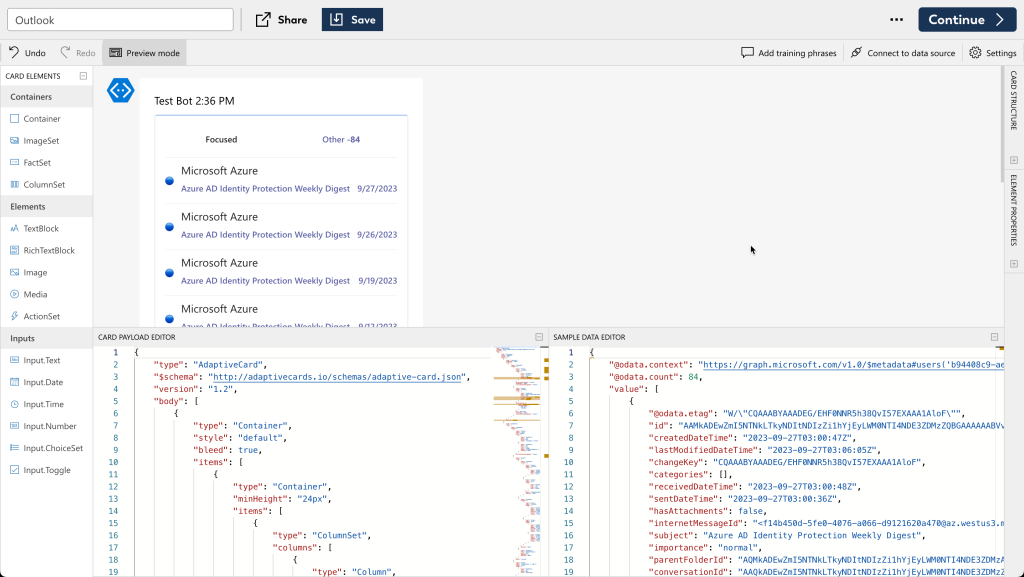
With adenin it’s super easy to make Adaptive Cards that can be connected to live data sources such as Hubspot, Salesforce, ServiceNow, or many others from the App Directory. The built-in low code designer helps you create a layout that incorporates your live data.
Once you’re done, Adaptive Cards are as portable as a YouTube video and can be embedded into intranets such as SharePoint or Viva Connections, MS Teams, Cisco Webex or your own personal dashboard.