


Having always been a popular Intranet platform, in recent years SharePoint has become ubiquitous. In part thanks to Viva Connections, a new set of features that improve employee engagement. Through Microsoft App Source, organizations find apps and extensions that suit their particular needs, for example to include data from outside sources like IT tickets, holiday allowances, lunch menus, etc.
This helps make SharePoint into a hub for all external data so users have to spend less time hunting for tabs, and can monitor things more conveniently and centrally. In this blog post we have summarized the 10 most popular business applications that organizations like to integrate into their SharePoint (or Viva Connections dashboard).
News/Podcasts web part

One of the most popular integrations is undoubtedly the ability to integrate your own RSS feeds, for example to share news from your company blog or a company podcast. This web part simply connect to your blog’s feed URL and then imports articles into your SharePoint page. You can even adjust the layout to suit your needs.
Salesforce web part

As the most popular CRM it is no surprise that Salesforce is the number one integration for SharePoint. Users like to get lists of their leads, opportunities or tickets as web parts that can be embedded on any page. Simply tweak the SOQL string to refine what type of list you want to see in your web part, all open leads, leads assigned to a particular user, tickets that are overdue by six hours or more, etc.
Get Salesforce integration for SharePoint web parts
Zendesk web part

Popular with help desks and internal service desks alike, users love to see their teams’ tickets and other metrics centrally on their SharePoint page or their Viva Connections dashboard. With the web part you can see different views of tickets, ideal for agents or managers that want to monitor the team. You can also submit new cases, ideal if you use Zendesk as an internal ticketing service or want to take support requests over the phone.

Used by many large enterprises, ServiceNow has a wide range of use cases from tickets, issues, project management, time tracking, knowledge base to custom solutions. How convenient would it be to easily integrate data from your ServiceNow instance to create better team sites, departmental portals or personal dashboards for users? With the ServiceNow app for SharePoint that’s not a problem at all.
Go to ServiceNow integration for SharePoint/Viva
MS Teams Shifts web part

Teams Shifts is getting used by many organizations, necessitating in some cases that upcoming shifts need to be shown on SharePoint pages for example for example for different stores in a retail company. With this web part you can easily embed a list of upcoming shifts for yourself or from your entire team, increasing visibility and making your SharePoint pages more useful.
Add Teams Shifts web part to SharePoint
Jira

Used for project management, as well as dev ops, the Jira app for SharePoint is a perfect web part for monitoring an on-going list of issues, ideas, user stories, etc. By editing the JQL query string you can modify what types of filters, assignees, types and so on you want to appear in your web part’s list or on your Viva Connections dashboard.
Jira integration for SharePoint
Trello

Another Atlassian favorite, Trello, is often used by marketing and project teams alike, from managing editorial calendars to creating easy Kanban-style boards for projects. Simply add the Trello app to your SharePoint and you can receive a list of all Trello notifications, or simply list all your starred Trello boards for easy bookmarking.
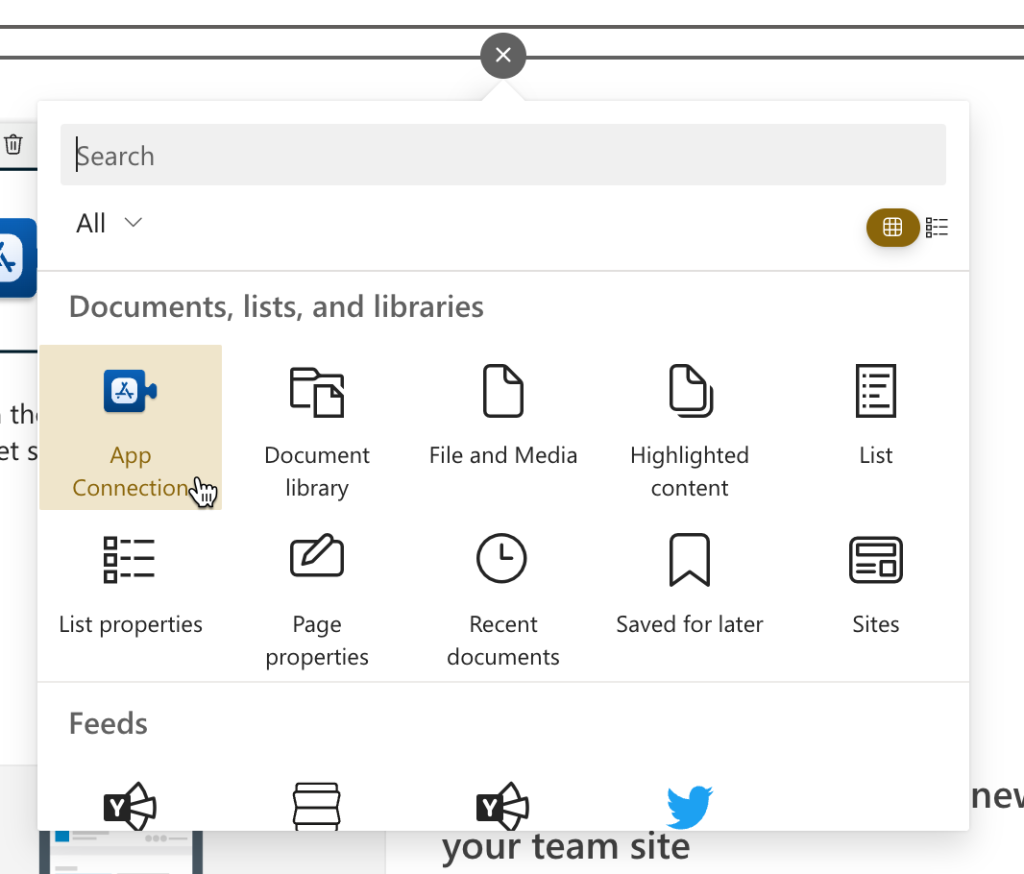
Simply add the App Connections web part to your SharePoint page or Viva Connections dashboard, click + Connect to an app and select Trello in the configuration window.
Google Calendar

Many organizations have outside calendars for their teams in their Google Workspace/GSuite, and with this web part these can easily be embedded into your existing SharePoint pages. Simply connect the web part to your Google account, and your upcoming events will show up.
Google Calendar integration web part for SharePoint
Slack web part

Many organizations have multiple messaging platforms in use, alongside Microsoft Teams. For those you can now easily embed recent conversations from Slack into your SharePoint pages. Simply connect the web part to your Slack account and show messages from a specific channel, or for a specific search term.
SharePoint integration for Slack

With the Workday web part (or Viva app) you can easily show users their time-off balance, and let them request new time off. Another Inbox web part for managers makes it easy to manage your Workday tasks directly from SharePoint.
Workday web part for SharePoint
~~~
Those are our ten most popular SharePoint integrations. To get any of them simply start by adding the App Connection web part to your SharePoint page or Viva Connections dashboard. Did we miss any? What are apps are you integrating into SharePoint? Let us know in the comments below.


