September ’21 update: New front-end, on-prem improvements

We’ve been working hard on a new version of the Assistant webapp, especially designed for enhanced customizability.

New SPA frontend

Illustration of Digital Assistant's front-end SPA architecture, showing version control tooling (Github, Gitlab), build tools (Netlify, Docker), a custom SPA and the Assistant server

We’ve got a new front-end based on React, that is open-source and 100% brandable by the tenant. Using the Gatsby site reactor, it is now possible to integrate the Digital Assistant within your existing Intranet stack.

The frontend is available on Plus cloud plans (deployment via Netlify CDN), or on-premises plans (for Enterprises) where deployment is handled via Docker containers.

This new frontend gives customers complete control over the look and feel of their UX, as they can freely modify the framework, customize the branding, as well as control the way cards are shown and managed.

If your organization wishes to take advantage of a forked version of our React frontend, please get in touch with your customer rep.

Board improvement: Drag-and-Drop

We’ve released a new Drag-and-Drop feature that’s now more robust, snappy and persistent across sessions. Granted, the old Drag-and-Drop wasn’t bad – but we’re perfectionists. 😉

Docker container performance improvement
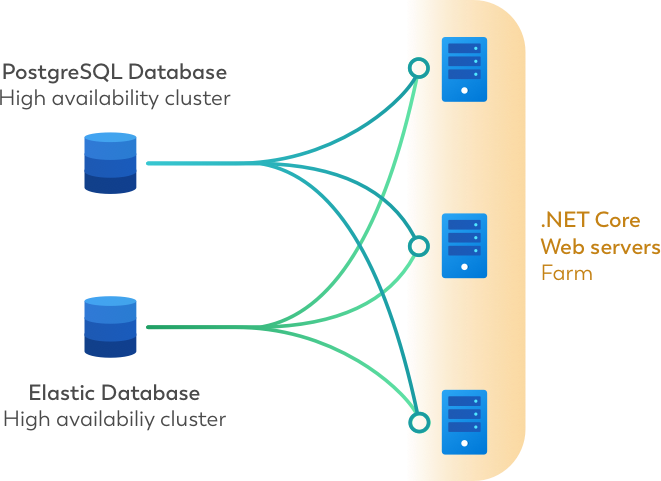
Illustration of Digital Assistant's on-premisis architecture, showing an example of 3 separate docker containers running PostgreSQL and Elastic databases
On-premises architecture of Digital Assistant using 3 separate Docker containers

A new version of the Docker container for on-premises plans is available. Using Docker 20 the Assistant’s Board should now see a loading time improvement of 20% for first-time loads, increasing to 50% for page refreshes.

If your organization wants to download the Docker containers for the on-premise version of Digital Assistant, please speak to your customer rep or use the chat function.

Related Posts
Read More

Revolutionize Your Cloud Experience with Hetzner Integration

Exciting news for all cloud enthusiasts and professionals! We are thrilled to announce the integration of Hetzner into our platform, bringing you a seamless cloud experience like never before. Hetzner, known for its reliable and high-performance cloud servers, is now at your fingertips, offering an unmatched blend of power, flexibility, and cost-effectiveness. Whether you’re scaling your business, hosting applications, or managing data, Hetzner integration makes it effortless. With this new addition, you can easily manage your Hetzner cloud resources directly from our platform, streamlining your workflows and boosting productivity. From deploying virtual machines to managing storage and networks, everything you…
Read More

Enhancing front-line worker experience in your intranet with Viva Connections

In today’s dynamic business environment, front-line workers (FLWs) — such as retail associates, warehouse workers, and service staff — are often the backbone of customer interactions and operational efficiency. Yet, they are frequently underserved by traditional digital tools and intranets, which are often designed with office-based roles in mind. Enhancing the experience of these workers through a modern, role-based intranet is not just a matter of convenience; it’s a strategic priority that can drive productivity, engagement, and satisfaction across your organization. Why improving front-line worker experience matters Front-line workers play a crucial role in representing the brand and ensuring smooth…
Read More

Build an AI chatbot for your team in 10 steps

Building a chatbot has become relatively easy with many dedicated tools, but to make an internal chatbot for work can be a tall order. Of course it needs to be 'smart' and personalized, but crucially it must overall become a tool that employees prefer to use over the 'old' way to get a task done.
Read More

Easily explained: Differences between Push and Pull APIs

Most applications, be it Facebook or a business app, make at least some of their data available for other applications to consume. The type of API architecture a service provides has a big impact on how developers need to program their apps. The standard way: Pull API This is also called “Polling” and it’s basically the same as refreshing your inbox every 5 minutes to check for new mail. As a developer, if you want to find out whether an API has anything new for the user, you just need to call and ask. Generally you can poll the API…