April ’21 update: New apps from Keap, Todoist & IEX Cloud

Another month, another great update for Digital Assistant users. Let us get straight to the facts:

New app: Keap

The e-mail marketing and CRM platform Keap has joined the App Directory as a new Connector for your Digital Assistant. Simply connect your Assistant to your Keap account and you can create Cards with the Adaptive Card designer.

The possibilities are limitless, for example you can show lists with your contacts, tasks or campaigns. Any Card you make in Digital Assistant works as beautifully in the Digital Assistant main app as it does through other channels, such as Microsoft Teams.

Digital Assistant's Adaptive Cards Designer being used to create a new Card using the Keap integration

To add Keap to your Digital Assistant now, just visit the listing in the App Directory.

New app: IEX Cloud

A popular provider of live stock market news and stock quotes, IEX Cloud can now be incorporated into Cards you create with the Adaptive Cards Designer. For example, you can start with our sample stock quote Card, or enhance it to include stock market news, historical data or any other endpoint from their documentation.

All you need for Digital Assistant to access your IEX Cloud account, is your API key.

Digital Assistant's Adaptive Cards Designer being used to create a new Card using the IEX Cloud integration

To use the new IEX Cloud app for Digital Assistant, just go to the App Directory and add it to your Assistant.

New app: Todoist

A favorite of freelancers and teams, Todoist is a fantastic task management solution. We’re happy to welcome the new Todoist app to our App Directory, allowing Digital Assistant users an easy new way to create interactive Cards with their Todoist data.

For example, with the Adaptive Cards designer you could create a list of all your or your team’s tasks in just a few minutes. Then just add in some AI training phrases and you’re good to deploy it to your Digital Assistant.
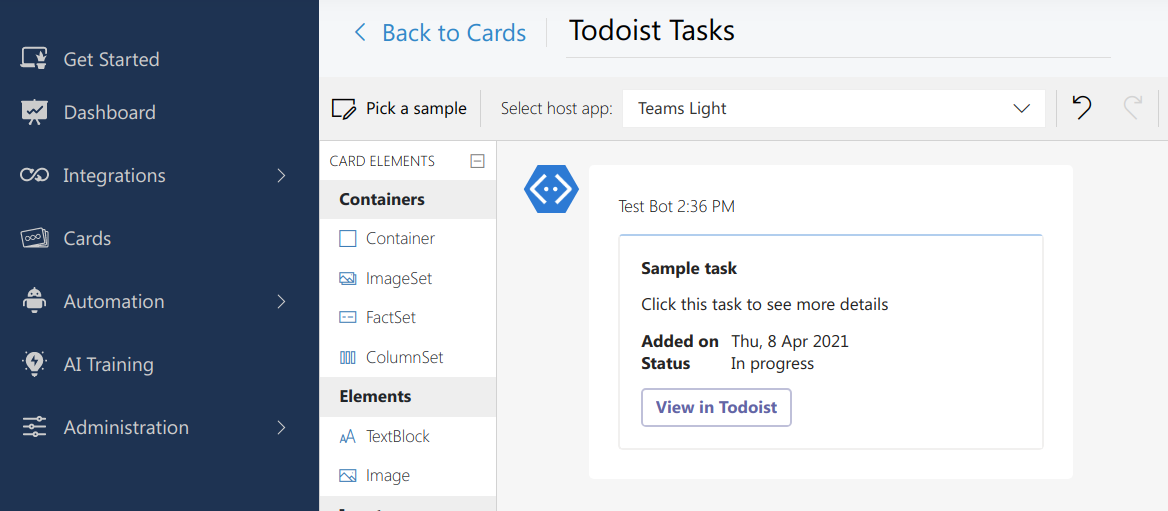
Digital Assistant's Adaptive Cards Designer being used to create a new Card using the Todoist integration

The new Todoist app for Digital Assistant is now available from the Digital Assistant’s App Directory.

Related Posts
Read More

Bring Asana’s Board View directly into SharePoint with the latest update

We’re excited to announce an enhanced feature for the Asana SharePoint integration by adenin: the ability to display your Asana project tasks in a sleek board view, right inside your SharePoint page! This update mirrors Asana’s familiar board layout, allowing you to see tasks visually sorted into columns—just like in Asana—but fully embedded in a SharePoint web part. Whether you organize by sections, priorities, or custom fields, this feature brings a more dynamic and actionable way to collaborate directly within SharePoint or Viva Connections dashboards. Configure the web part to select your preferred Asana project and column criteria, and watch…
Read More

Embrace Seamless Task Management with Asana Integration

Are you looking for a way to supercharge your team’s productivity and collaboration? Look no further! We are thrilled to announce the integration of Asana, the ultimate task management tool, into our suite of apps. Asana is renowned for its intuitive design and powerful features, making project management and team collaboration more efficient than ever. With Asana’s integration, you can effortlessly track, manage, and organize your work from a single, user-friendly platform. This integration simplifies your workflow, ensuring that everyone in your team stays on the same page. Whether you’re planning a complex project or just managing daily tasks, Asana…
Read More

Supercharge Your Project Management with Our New Microsoft Planner Integration!

We’re excited to announce the latest addition to our suite of productivity tools: the integration of Microsoft Planner with your digital workplace! This new integration empowers teams to streamline their project management processes directly from our platform, enhancing collaboration and efficiency. Microsoft Planner is renowned for its intuitive, user-friendly interface that simplifies task management and project tracking. With this integration, users can now access Planner’s features without ever leaving your dashboard. Seamlessly view, update, and manage your Planner tasks alongside your other essential tools. Ready to boost your productivity? Check out the full details in our App Directory!
Read More

Introducing the Salesforce SharePoint web part

Boost your productivity by connecting Salesforce and SharePoint with the new Salesforce SharePoint app! This integration allows you to seamlessly view and interact with your Salesforce data directly within your SharePoint pages. Whether it’s managing customer details, monitoring sales opportunities, or reviewing reports, everything you need is right at your fingertips—no switching between platforms required. Ready to streamline your workflow? Explore the full list of features and benefits in Microsoft AppSource!