


Doing your kids’ history homework, writing marketing plans and killing off Google – ChatGPT seems to single-handedly do it all. And it came almost out of nowhere. In this article we’ll inspect whether Microsoft, having recently increased its share in OpenAI, could enhance SharePoint or Viva Connections with it.

We’re starting off with SharePoint’s search as the existing product, before considering if a chatbot might come to SharePoint.
Search
Search engine optimizers have long observed that most Google searches do not result in a click anymore. That’s due to Google’s featured snippets, that present passages of crawled text directly on the results page. This allows the user to get answer without having to click on any of the individual results.

While Bing has these, too, Google’s are arguably better due to their billions of search queries they use to test, refine and refresh answer boxes with. Answer boxes are in fact so popular with Google users, many wish SharePoint’s search could work “just like it“.
Microsoft primarily sees ChatGPT as a way to advance search. Aside from the popular chatbot function you see in the news (we’ll discuss this in the next section), ChatGPT’s model is also tasked with improving Bing’s featured snippets. Instead of harvesting billions of user queries like Google, Bing takes the concept to the “AI level” and uses ChatGPT’s 175 billion parameters for a similar, if not better, experience.
That begs the question: could ChatGPT be, in a sense, scaled down to harvest all the data a single organization has in its SharePoint to create an AI model specific to that organization? As always in life, it’s a question of cost: running ChatGPT’s training model costs OpenAI $12 million, which is the reason why it’s knowledge hasn’t been refreshed since September 2021.
How would such economics work for a single organization? Would companies be willing to spend $2,000 to re-run their AI model everytime a document gets uploaded?
Unlike OpenAI, Microsoft’s version of GPT-4 which is used for Bing Chat does contain up-to-date information. You may think that perhaps the folks in Redmont just found ways of making the AI cheaper to update, however the opposite appears to be the case. GPT-3 cost 200x the amount of money GPT-2 consumed when updating its AI model.
So clearly, Microsoft is just be happy to throw money at this for now. If I had to speculate why Microsoft opens up the pursestrings, it’s pretty clear they only have one goal: Eat into Google’s 93% market share.
Microsoft 365 on the other hand has its own team focused on improving search, called PnP Modern Search. Even though there are some fantastic add-ons and features coming out for it, it’s mostly an effort to bring SharePoint search up to become state-of-the-art. At the time of writing their roadmap shows no signs of adapting ChatGPT for their purposes.
In a way this makes sense: Unlike in consumer search, in the intranet market Microsoft comfortably leads the pack ahead of competitors. Because of this, chances are they’re not in a rush to figure ChatGPT out for SharePoint.
Chatbot

A central theme of ChatGPT is, that it’s blurring the lines between search and chat. This is certainly true in the case of Bing, which is adding a button to result pages that requests a written answer be composed for the user. Comprising 570GB worth of text, GPT-3 draws from a vast pool of knowledge that can be used as inspiration for business related activities, such as writing marketing plans, to drafting contracts.

We’re likely to see many verticalized ChatGPT-based applications for lawyers, real estate agents or sales people that have been specially trained to assist in each industry respectively. In fact, there’s already a UK law firm that is beta-testing ChatGPT to suggest copy for contracts.
This could serve as a fresh impulse for Microsoft Teams, that initially was very reliant on chatbots until they recently pivoted more towards incorporating Viva Connections. This de-emphasizing of chatbots wasn’t surprising, as even Gartner had entirely dropped chatbots of their infamous Hype Cycle in 2021.

What is surprising is that chatbots for internal use cases made such a quick return. It’s still early days, but it seems that specialized chatbots could make their ways into the Microsoft 365 portfolio. If not by Microsoft themselves, then likely by 3rd parties that use OpenAI’s developer program. Regardless, these chatbots are probably most poised to improve the MS Teams chatbot experience. Don’t forget Microsoft is still keen to completely obliterate Slack after they already forced them to get acquired by Salesforce. And since Microsoft Teams is the only chat-based UI that comes out of Microsoft 365, it – and not SharePoint – has the highest chance of gaining new ChatGPT-derived features.
Editor’s tip:
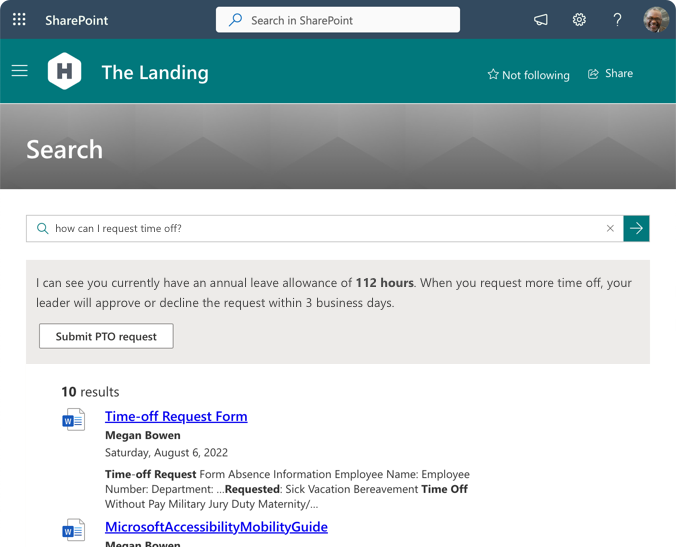
If you want to see what’s possible in SharePoint look no further than PnP Modern Search that I discussed in the first section. With it, you can already train a SharePoint web part to answer QnA-style questions just like ChatGPT would. To do this, you need to install PnP (it’s free) and then enable the Answer Cards web part.
Workplace automation
ChatGPT can code, like a programmer. You can ask it in plain English to write you a script for pretty much anything or make a simple website according to your requirements. It can even go back and improve sections based on your feedback. There is a demonstration of this by a popular YouTuber. But this is actually just one of two Microsoft chatbots that can code; the other one is GitHub Copilot which has more of a developer focus.
Someone already discovered ChatGPT can write PowerShell scripts to run through routine SharePoint admin tasks, such as uploading files.
With all this mind, it’s not unthinkable SharePoint might gain some new features to compete with “no code coding” platforms that are popular with users. Microsoft’s own PowerAutomate, along with popular competitors such as Zapier or Workato could perhaps be opened up to an even broader audience if they could be programmed simply in a short conversation in plain English. For example you could use it to:
- Creating a team or communication site based on what you want to achieve and pre-fill it with a suitable template, invite relevant users, etc.
- Debug permission issues for pages, users or search results by running through turn-by-turn questions
- Fill a web part on a SharePoint page with information whenever something new is recognized in a data source
- Follow-up with users on tasks discovered in unstructured data such as the minutes from a meeting
- Creating PowerAutomate workflows between two apps purely in a conversation
- Generate a personalized briefing on the fly based on when you last logged in and answer follow-up questions
What does ChatGPT say itself?
I thought it would, finally, be good to let ChatGPT gives its own opinion of whether it may improve SharePoint in the future. 😉

~~~
This is my analysis of the current ChatGPT facts as we know them. After I just predicted that chatbots won’t make a dent to intranets in 2023, it seems everything is upside down and we can expect fantastic things on the AI chatbot front this year! What do you make of this? Let me know in the comments below.
]]>


