Feature update: SharePoint embedding for Digital Assistant Cards

We’ve overhauled our SharePoint Embed channel to be just one easy to install package for Office365.

In this new version you get:

  1. Assistant results on Search pages
    Digital Assistant Card displayed inline in SharePoint Online search results
  2. A more convenient sidebar for editing the settings of the Cards Webpart
    Settings editor sidebar for the Digital Assistant webpart in SharePoint online

You can enable the new SharePoint Embed Channel from your Digital Assistant admin area, and by following the installation instructions from our documentation.
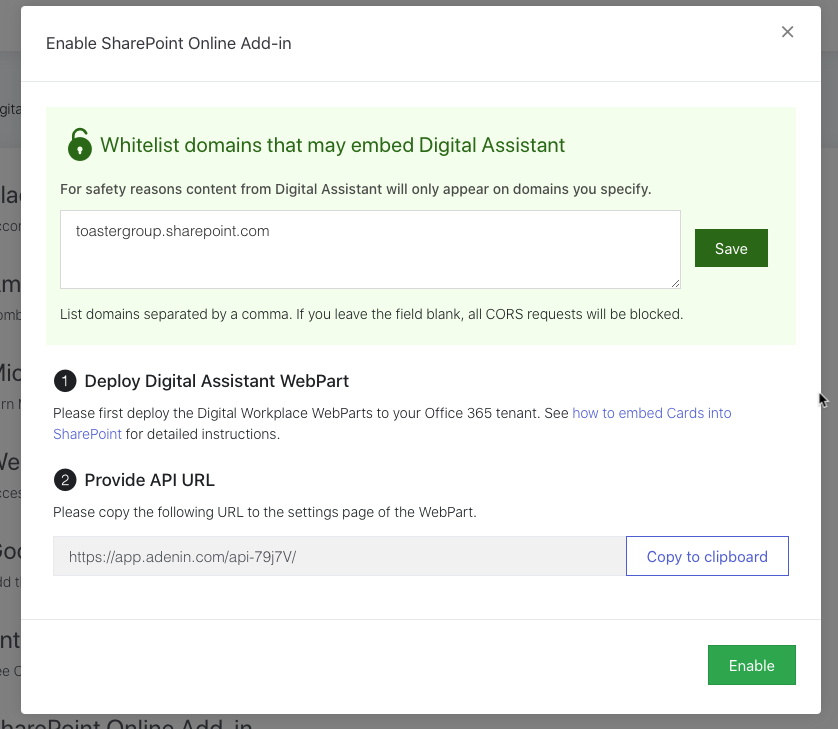
Enable the Digital Assistant Add-in for SharePoint Online

Let us know if this update improves your SharePoint experience in the comments below!

Related Posts
Read More

Elevate Your Data Management with Google Sheets Integration

We are thrilled to announce the integration of Google Sheets into our platform, a game-changing tool that promises to elevate your data management experience to new heights. Google Sheets, known for its versatility and user-friendly interface, brings a fresh perspective to organizing, analyzing, and sharing data. With Google Sheets, you’re not just working with any spreadsheet tool; you’re accessing a platform that allows for real-time collaboration, complex data analysis, and seamless integration with other tools. It’s ideal for everything from tracking project timelines to financial planning, making it a versatile asset for any team. For those in the Microsoft ecosystem,…
Read More

July ’22 update: Apps, Zaps and Admin area changes

Wow, what a Fourth! The party continues with all the new things we have packed into Digital Assistant this month… New feature: App Directory picker We’ve now made it easier to add apps from our App Directory to your Board. Just hit the ‘+’ symbol on your Board to open an app picker that shows you the most popular apps. You can either directly add an app to your Board or click Browse all to open the full App Directory in a pop-up modal. This dropdown also lets you manage what Cards appear on your Board, or enable the testing mode that generates sample…
Read More

Embed your LinkedIn company feed into SharePoint pages

Keeping your employees informed and engaged just got easier! With the LinkedIn Company Feed integration, you can embed your organization’s LinkedIn feed directly into your SharePoint site as a web part or onto your Viva Connections dashboard. This integration ensures that the latest company news, industry updates, and thought leadership posts are easily accessible to your internal teams. Why does this matter? Sharing your LinkedIn content internally provides employees with valuable insights into how your organization communicates externally. It also fosters a sense of alignment and pride as they see achievements, updates, and industry engagement showcased in real-time. Instead of…
Read More

September ’20 updates: Design Cards as Adaptive Cards and SCIM user management

We’ve been working hard to add the features you’ve been asking for to your Assistants. Here’s a quick rundown of the product updates coming your way this September. 1. Adaptive Card Designer We’ve added a new way to quickly and easily design Cards for your Assistant. Microsoft’s Adaptive Card designer is now available in Digital Assistant, so you can rapidly create and deploy custom Cards that can connect to any app or Postman connector of your choice. To create a new Adaptive Card, navigate to Your Card Hub inside the admin area, then select Add Adaptive Card from the Add…